If you need to pause billing for auto-renewing payment, the simplest recommendation is to just edit the amount of the renewing order to £0.00, and then set the amount back to the normal price when the customer(s) will be due to return/start paying again.
For example, your customers are billed monthly, but someone has suffered an injury that requires several months’ recovery.
Pausing billing for an individual:
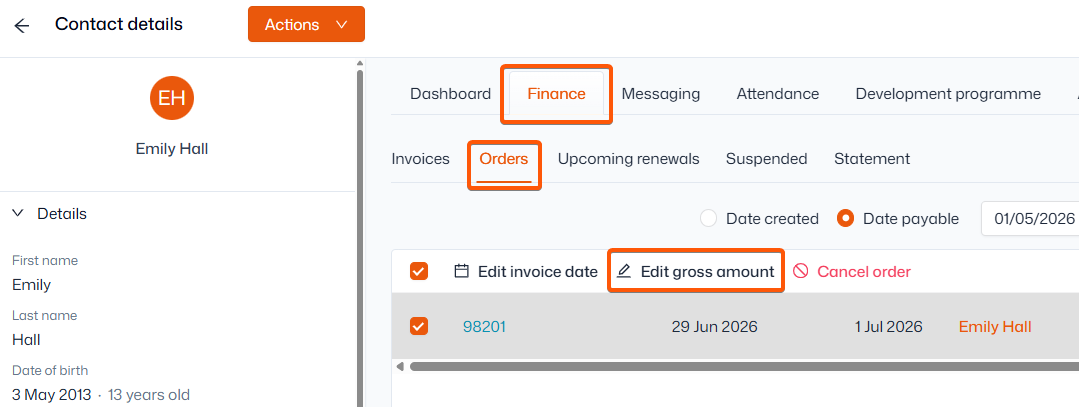
- Search for the contact and click their name
- Click into the ‘Finance’ tab at the top, then ‘Orders’
- Select the upcoming order (by default, these are generated 27 days before the billing date)
- Click ‘Edit gross amount’ and update it to £0
- If the amended price needs to be in place for 2+ months, select ‘Lock price for renewals’ so future orders will stay at £0 until put back to the regular price (same steps)
- Select the upcoming orders (by default, these are generated 27 days before the billing date)
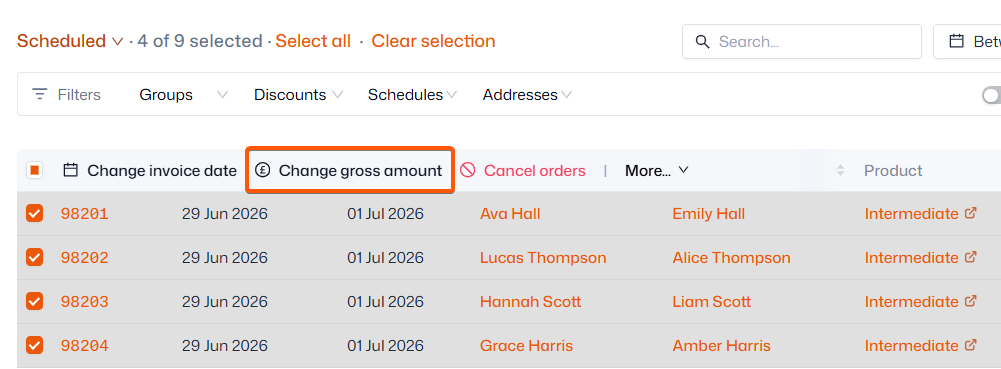
Pause billing for several contacts:
This method can also be used for one contact.
- Navigate to Sales admin > Orders
- Click ‘Change gross amount’ and update it to £0
- If the amended price needs to be in place for 2+ months, select ‘Lock price for renewals’ so future orders will stay at £0 until put back to the regular price (same steps)