
How to enable offline payments:
If you haven't done so already, you'll need to set up pre-authorised payment details to allow transaction fees for offline payments to be collected.
Note: Transaction fees for offline payments are set at 2.5% + VAT (3%).
- Navigate to Organisation setup > Accounting and billing
- Locate ‘Thrive4 pre-authorised payment details’
- Click ‘Set-up pre-authorisation’ and provide the necessary payment details
How to record offline payments:
To record an offline payment, the invoice must be outstanding (fully or partially). This means that there must not be any payments processing (pending) against the invoice.
- Navigate to Sales admin > Invoices
- Alternatively, head to a contact record and into the ‘Finance’ tab
- Locate the relevant invoice
- Select the invoice using the checkbox or click the three dots on the right-hand side
- Click ‘Payment’ then ‘Record offline payment’
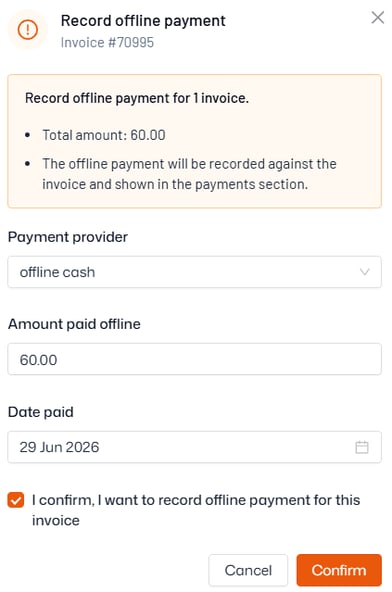
- Select the payment provider, the amount paid, and the date it was paid
- Click ‘Confirm’ to record the payment
If the full value of the invoice is marked as paid offline, its status will immediately change to ‘Reconciled’ and will no longer be outstanding for the account balance.
If only part of the invoice is paid offline, you can record another offline payment later as needed, or the account owner can login to the Thrive4 app/online portal to make payment for the rest of the balance via card or direct debit.