Direct debit dual signatories
In rare cases where a member’s direct debit mandate requires two authorised signatories, the payment will remain in a pending state indefinitely until both approvals are received.
For more information and guidance on how to resolve this, click here.
Failed payments
If a payment fails, the system will automatically retry it up to two more times. Each retry resets the processing timeline, which means the invoice can remain in a pending state for an extended period until a payment succeeds or the final attempt fails.
Stuck payments
If a user cancels their direct debit mandate while a payment is pending, the payment may become stuck in the system.
When this happens, we advise cancelling the pending payment (this will not cancel the invoice), so the user can log in to retry payment with a new mandate. To cancel a stuck payment, head to Sales admin > Payments, locate the payment, and click ‘Cancel’ on the right-hand side.
Note: If a user has set up a new mandate after cancelling one mid-payment, you will not be able to cancel the stuck pending payment. If this happens, get in touch with our support team at help@thrive4.com for assistance.
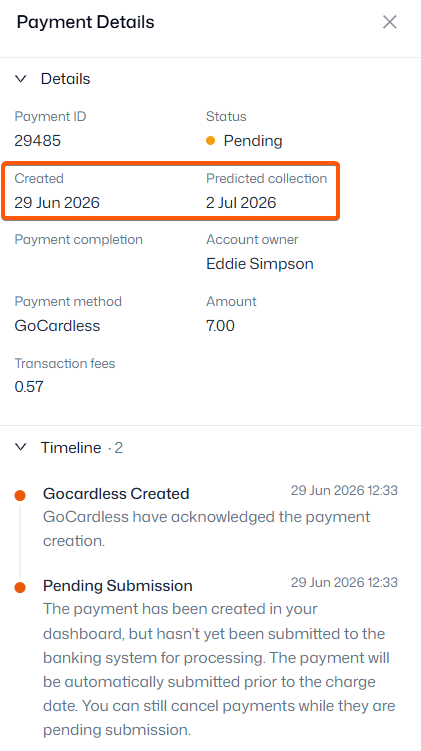
How to view a payment’s timeline:
- Navigate to Sales admin > Payments
- Locate the pending payment
- Click the payment ID on the left-hand side
- A panel will appear on the right of your screen, showing the creation (start) date and predicted collection date (when the funds are expected to be debited from the user’s account)