
Billing settings
If you have chosen to bill weekly, monthly or annually and have noticed that your contacts are not auto-renewing (having their orders regenerated for each billing cycle) then it's likely that you have not enabled the 'auto-renew' setting in your product settings.
To locate this setting, navigate to Product management > Products, select the relevant product, and open the ‘Billing and renewal’ section.
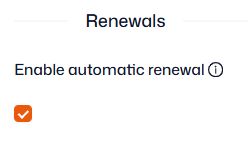
For more help on how to setup your product billing, read our help article here.
Suspended renewals
If the product setup is correct, and just one or a few contacts haven’t renewed, it's possible renewals have been suspended. For more information on suspended renewals and how to undo them, read our help article here.
Manually amended orders
It’s possible a member has been renewed but isn’t paying as their renewing order has been ‘locked-in’ at £0.
Note: Your Invoices page and Product sales report won’t show £0 invoices by default, you can surface them with the ‘Zero value sales’ toggle in the top-right corner.
For more information on manually amended orders and how to undo them, read our help article here.