
hereDevelopment programmes consist of levels and skills, and you can add as many of each to a programme, in whatever order you desire.
How to create a development programme:
- Navigate to Organisation setup > Development programme > Create
- Simply give the programme a name and click ‘Finish & Save’
- You’ll then be redirected to ‘Manage’, where you can start building your levels and skills
Building levels and skills
- Select your development programme from the drop-down in the top-left corner
- To add your first level, click ‘Create new level’
- Click on the level to give it a name and add the skills within
- Name each of your skills, and optionally add a corresponding image or video URL (e.g. demonstration of the skill)
- Click ‘Save’ after each new skill
- Once all the skills are added, you can order them (commonly used to show what order skills need to be completed in)
Continue this process until all your required levels and skills have been added. You can then link the programme to your classes and start tracking your members’ progress.
Note: Only admins and coaches can record progress.
How to link a development programme to a class:
- Navigate to Product management > Products
- Select a class from the left sidebar
- Open ‘Development programme’ at the bottom of the page
- Select your programme and choose what levels to link to the class.
- Click ‘Save’
Note: Only one development programme can be linked to any given class.
How to record progress:
- Navigate to the Timetable
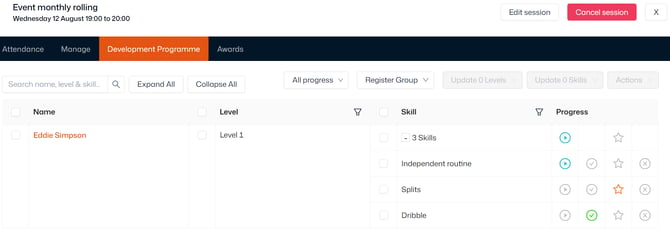
- Click the ‘Development programme’ tab
- Displayed is each attendee, linked level, and progress trackers
- You can mark the contact as ‘Working on’ or ‘Achieved’ each level
- Click the plus sign in the ‘Skill’ column to track progress for each individual skill
- You can mark contacts as ‘Working on’, ‘Completed’, ‘Achieved’, and ‘Failed’ each skill
- Use the search bar to look for a skill or attendee, or filter by progress and Register group
- Check out our full guide here for help setting up Register groups
Tip: You can also track progress in the ‘Development programme’ tab of contact records.
To keep members/parents informed of progress, you can set up notifications that automatically send when skills/levels are started, achieved, or failed.
How to delete a development programme:
- Navigate to Product management > Products
- Select the Development programme from the left sidebar
- Within ‘Details’, change the status to ‘Deleted’
- Alternatively, click the bin icon in the top-left corner then ‘Confirm'
- Click 'Save'