
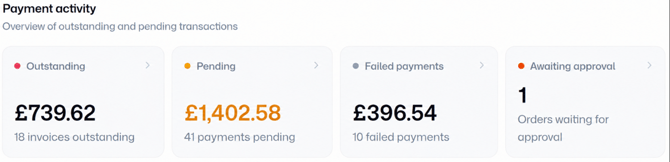
Payment activity
A summary of your current and past finances. Click into any figure to see the full details and take action within Sales admin.
Outstanding
The total value of all partially or fully unpaid invoices.
Pending
The total value of all invoices with payment attempts currently processing. After the processing window has elapsed, these invoices will either retry payment, reconcile, or move to Outstanding.
Failed payments
The total value of all failed payments against outstanding invoices. Check out our full guide to resolving failed payments here.
Awaiting approval
How many orders are currently awaiting admin approval – click through to approve or deny. For more information on order approval, check out our full guide here.
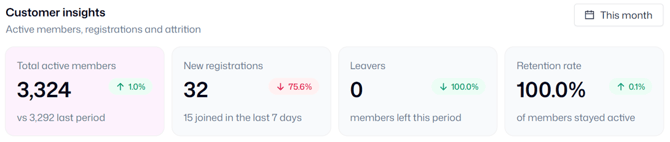
Customer insights
An overview of your member numbers, growth, and retention, over a given time period, compared to the previous period. Use the calendar icon in the top-right corner to change the timeframe shown.
Total active members
The number of contacts with an active membership (or upcoming class attendance if you run classes).
New registrations
The number of new contacts that have signed up to a membership (or joined a class).
Leavers
The number of members who were marked as inactive.
Retention rate
The percentage of members who were active at the start of the given timeframe and remained active throughout.
Financial insights
Quickly see your best-sellers; this graph shows your top ten products (by invoiced value) over a given time period, compared to the previous period. By default, this shows you the last three months’ invoiced value compared to the three months before, but you can easily change the period shown using the calendar icon in the top-right.
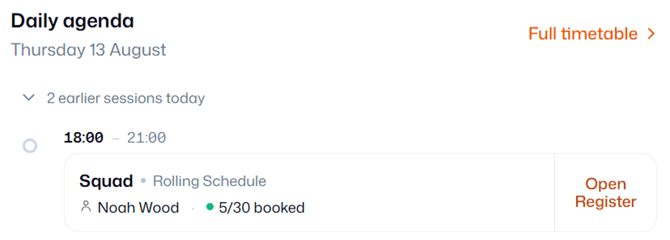
Daily agenda
If you run classes or events, this area shows an overview of what’s ongoing or upcoming, including times, capacity, and attendance. Click ‘Open Register’ to quickly take attendance without searching for the right session in the timetable.
Today’s attendees
A daily or weekly summary of anyone attending classes/events:
- New starters – contacts taking their first ever session with your organisation
- Trialists
- First sessions – contacts attending a new class or event for the first time
- Birthdays
No need to rely on your memory to welcome new members to sessions or celebrate a birthday!