
With Gift Aid, eligible charities and community amateur sports clubs (CASCs) can claim an additional 25p from HMRC for every £1 donated by an eligible UK taxpayer.
That means a £20 donation could be worth £25 to your organisation, helping you put more towards the equipment, facilities and opportunities your community relies on.
Thrive4 makes it easier to collect Gift Aid declarations alongside donations, so you can focus on putting that extra support to good use.
Before you get started
Gift Aid is available to eligible organisations collecting donations through the Donations product type.
Need help getting started with donations? See our guide on Adding new products: Setting up Donations.
Enabling Gift Aid
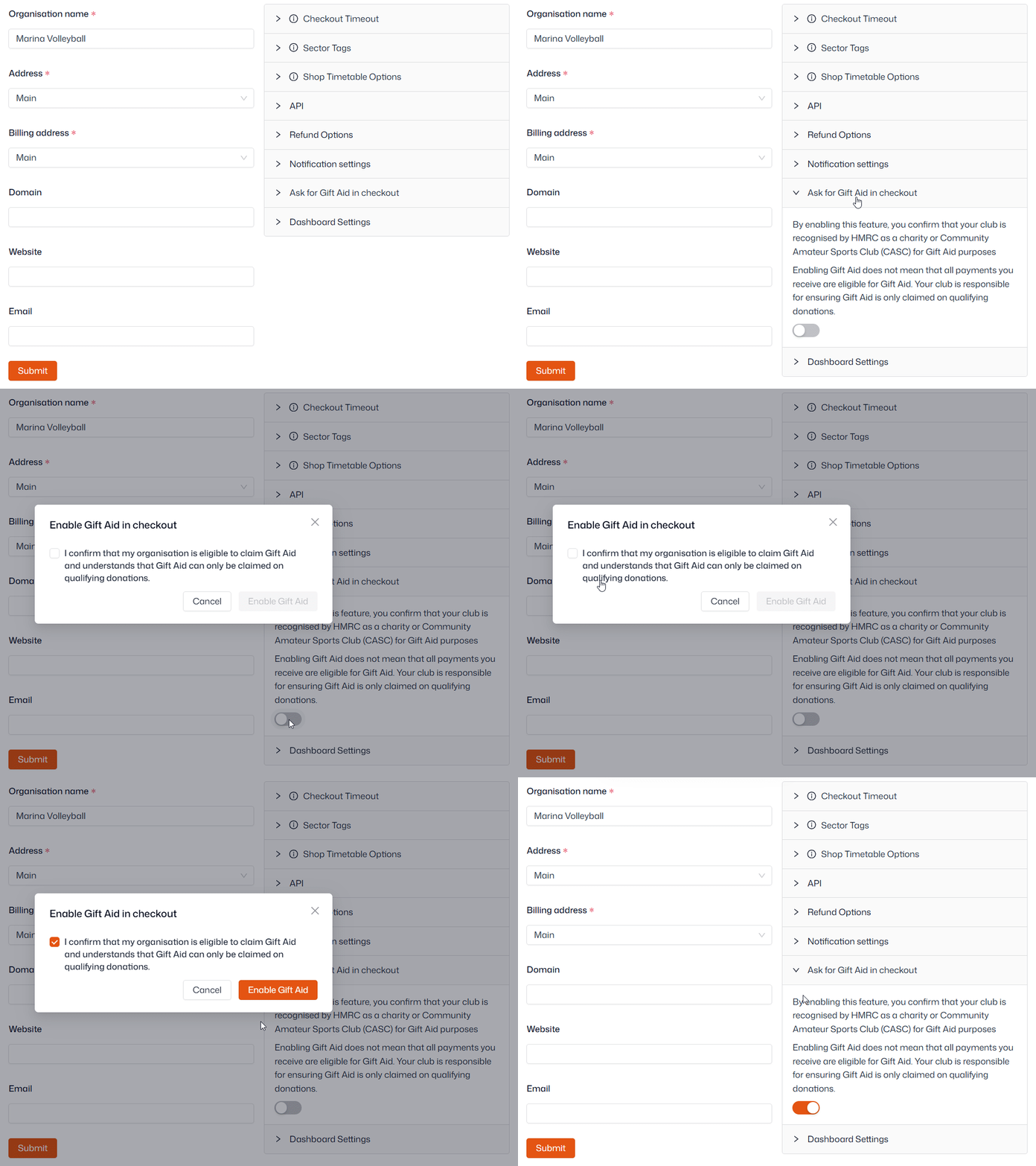
- Navigate to Organisation setup > Settings
- Open 'Ask for Gift Aid in checkout'
- Click the toggle
- Confirm your eligibility and click 'Enable Gift Aid' to save
-
That's it! Contacts will now be asked to make a Gift Aid declaration when making a donation
A few things to keep in mind:
- Gift Aid is enabled across your organisation, so it applies to all donation products
- It cannot be switched on or off for individual Donations products
- You can still collect donations without enabling Gift Aid
Important: Thrive4 helps you collect and record Gift Aid declarations, but your organisation is responsible for checking eligibility and submitting claims to HMRC.
What will contacts see at checkout?
When someone makes a donation through your shop, they'll be asked whether they'd like to make a Gift Aid declaration. They'll need to accept or decline the declaration before continuing through checkout.
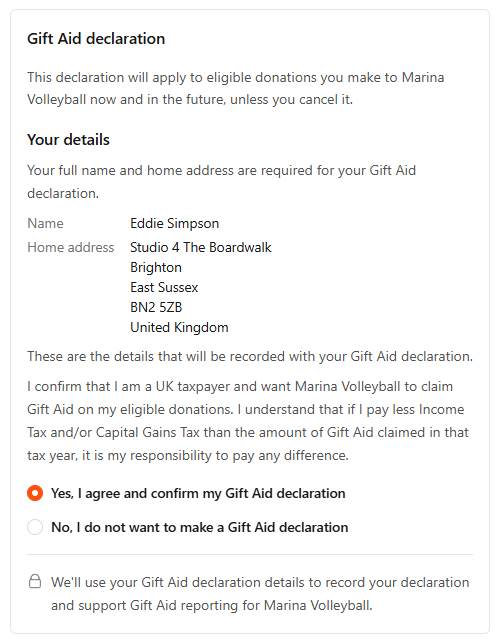
Once they've made their choice, it's saved against their account - they won't need to complete the same declaration every time they donate, making future contributions quicker and easier.
Contacts can withdraw or confirm a declaration at any time from their Thrive4 MemberHub account. For steps on how to do this see our Member guide to Gift Aid declarations.
Reporting on Gift Aid and making claims
Keeping track of donations and Gift Aid declarations is straightforward in Thrive4 - all the relevant information can be brought together in one place, helping you prepare your Gift Aid claims without having to chase supporters for their declaration details.
- Navigate to Reporting > Financial reports > Product sales
- You can filter by timeframe in the top-right, and by product in the top left
- Click the total 'Paid' value for your Donation product(s) to enter the detailed report
- Use 'Manage columns' in the bottom-right corner to adjust the information shown, ensuring the following are included:
- Account owner
- Product
- Invoiced date
- Paid
- Account owner address
- Gift Aid declaration active at payment date
- When you're ready, you can Export the report using the button in the bottom-right corner
You can use this information to review eligible donations and prepare your Gift Aid submission to HMRC.
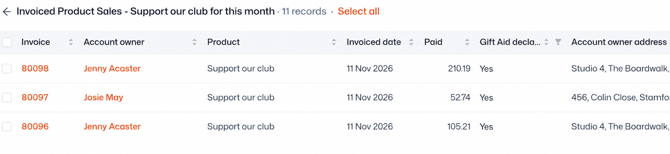
Important: For compliance reasons, the 'Gift Aid declaration active at payment date' column only changes to 'Yes' or 'No' once payment has completed.